


 Microsoft AI
13 min
Microsoft AI
13 min
Introduction
Selecting a customer relationship management (CRM) system is one of the most critical, high-stakes technology decisions a mid-market organization can make. This choice is not merely about picking a tool for logging sales calls; the platform your enterprise selects becomes the foundational digital core for your sales operations, customer service teams, and long-term growth analytics. In the modern digital economy, data-driven decision-making determines market velocity, making your CRM the primary engine behind customer retention, pipeline visibility, and revenue predictability.
Globally, two primary platforms continue to dominate enterprise-grade evaluations: Microsoft Dynamics 365 and Salesforce. Both systems represent highly mature, cloud-based software environments backed by multi-billion-dollar R&D budgets, robust innovation roadmaps, and deep feature sets. However, beneath the surface level of dashboards and contact records, these two giants approach system architecture, licensing structures, data models, and ecosystem integration in fundamentally different ways.
When evaluating Dynamics 365 vs Salesforce for mid-market deployment (typically organizations with 100-500+ users), decision-makers quickly realize that the final choice rarely hinges on a single, isolated sales pipeline feature. Instead, the strategic decision depends on holistic architectural alignment: how cleanly the platform maps to your existing corporate technology stack, how it affects your long-term total cost of ownership (TCO) models, and how naturally it integrates into your users’ day-to-day operational workflows.
While many organizations treat this comparison as a simple decision matrix, a quick feature checklist cannot provide the deep architectural context required to manage technical debt, avoid integration friction, and scale operations smoothly. This comprehensive comparison guide serves as an architectural blueprint, capturing critical consideration-stage operational realities and arming enterprise decision-makers with the technical insights required to choose the ideal Microsoft-native CRM infrastructure for long-term growth.
Platform Architecture and System Philosophy
The foundational differences between Microsoft Dynamics 365 and Salesforce stem from how each platform was originally conceived, built, and designed to scale over time. Understanding these distinct philosophical frameworks is essential for predicting how each system will perform as your business processes evolve.
Salesforce: The Dedicated CRM Ecosystem
Salesforce was architected from the ground up as a cloud-native, CRM-first platform. Its primary design objective is the optimization of customer-facing operations, including sales, customer service, and marketing engagement. Because of this heritage, Salesforce operates essentially as a highly specialized, standalone cloud ecosystem. For mid-market organizations that prioritize a “best-of-breed” software strategy, Salesforce offers an incredibly robust and flexible engine that remains completely independent of their back-office infrastructure.
Key architectural characteristics of the Salesforce ecosystem include a proprietary customization engine that drives customization through declarative (point-and-click) tools, Salesforce Flows for visual automation, and its proprietary object-oriented programming language, Apex. This specialized development environment allows for highly tailored workflows, but it requires developers who possess Salesforce-specific certifications and training. Additionally, the platform features the AgentExchange marketplace (formerly AppExchange), which is one of Salesforce’s greatest competitive advantages. As of June 2026, this marketplace features over 5,800 prebuilt applications, components, and direct connectors. If your organization uses highly specialized, industry-specific third-party tools, there is a strong probability that a pre-configured connector already exists on the AgentExchange.
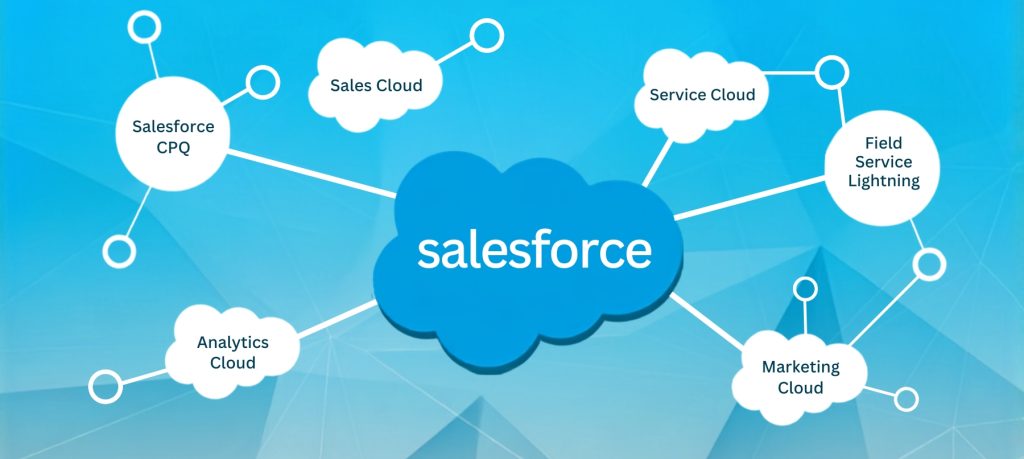
Furthermore, Salesforce excels at synthesizing marketing, sales, and service data into a singular, unified profile through what is known as the Customer 360 view. This model ensures that every department interacting with a customer has immediate visibility into their history, support tickets, and engagement metrics. However, this isolated ecosystem model introduces distinct integration challenges. Because Salesforce exists as an independent, external data repository, connecting customer-facing CRM records to broader enterprise resource planning (ERP) tools, supply chain platforms, or financial systems typically requires continuous custom integration work, complex API configurations, or expensive middleware solutions.
Microsoft Dynamics 365: The Unified Business Suite
Microsoft approaches enterprise software through a broader, platform-wide lens. Rather than treating the CRM as an isolated database, Microsoft built Dynamics 365 as a modular suite of business applications running natively on the very same Azure cloud infrastructure that powers Microsoft 365, Teams, and the Power Platform. This unified architecture relies on a shared data foundation known as the Microsoft Dataverse. Instead of copying and syncing data across disparate systems via APIs, Dynamics 365 utilizes the Dataverse to unify information across your entire business footprint, creating a single source of truth that eliminates data silos and reduces integration complexity.
This design offers several fundamental operational advantages. First, native cross-application workflows become possible because Dynamics 365 shares a data layer with Microsoft 365. Customer records flow naturally into SharePoint document libraries and Microsoft Teams channels without crossing external security boundaries or requiring complex custom integrations. A sales team can collaborate on an active opportunity inside a Teams channel, and those files are automatically linked to the corresponding CRM record in SharePoint. Second, seamless quote-to-cash alignment is achieved for growing mid-market enterprises looking to bridge the gap between front-office sales pipelines and back-office financial systems. Dynamics 365 Sales connects out of the box with Microsoft ERP engines like Dynamics 365 Business Central, allowing an opportunity won by a sales representative to instantly generate a sales order and invoice within the accounting system, creating a smooth, automated workflow.
Third, unified security and governance is a significant advantage because Dynamics 365 operates entirely within your organization’s existing Microsoft Entra ID (formerly Azure Active Directory). This means your IT team can manage user access, authentication policies, data compliance, and security permissions from a single, centralized console, drastically reducing administrative overhead while ensuring consistent security posture across all applications.
| Operational Category | Microsoft Dynamics 365 | Salesforce Sales Cloud |
| Primary Architectural Focus | Unified business operations platform (CRM + ERP + M365) | Specialized “best-of-breed” sales & service ecosystem |
| Sales Pipeline Management | Native tracking directly within Outlook and Teams; inbox-optimized | Visual Kanban pipelines, interactive forecasting, and CPQ tools |
| AI and Automation | Microsoft Copilot woven natively into interface (included with Enterprise license) | Agentforce & Einstein AI offer autonomous agents (add-on pricing) |
| Ecosystem & Integrations | Deep native alignment across Microsoft 365, Power BI, and Azure | Massive third-party app marketplace via AgentExchange |
| Back Office & ERP Alignment | Out-of-the-box data sharing with Dynamics ERP (e.g., Business Central) | Requires external integration tools or middleware (e.g., MuleSoft) |
| Core Identity & Security | Centrally managed via Microsoft Entra ID (Azure AD) | Managed via Salesforce identity/SSO frameworks |
Detailed Functional Capabilities
While both platforms provide industry-leading features for managing leads, tracking opportunities, and running reports, their underlying design philosophies drastically alter how these features are configured and utilized. Understanding these differences is crucial for making an informed decision that aligns with your organization’s specific operational needs.
Comparative Capabilities Matrix
Sales Pipeline Management Deep Dive
Every CRM must provide sales representatives with a clear view of their deals, but the user experience of managing that pipeline differs significantly between the two systems. Microsoft Dynamics 365 focuses heavily on contextual productivity. Because many mid-market sales representatives spend their working hours inside their email inboxes, Dynamics 365 embeds its functionality directly into Outlook and Teams. A rep can view a customer’s entire interaction history, update opportunity values, log a phone call, and create follow-up tasks directly from their inbox panel without ever having to switch applications. This seamless integration eliminates context switching and ensures that CRM data entry becomes a natural, friction-free extension of everyday work patterns.
On the other hand, Salesforce Sales Cloud is renowned for its highly interactive, visual pipeline management tools. Its drag-and-drop Kanban boards, intuitive forecasting dashboards, and advanced Configure, Price, Quote (CPQ) tools make it highly appealing for B2B sales organizations with complex, structured, transactional pipelines. Salesforce provides sales managers with granular control over stage progression, opportunity scoring, and historical pipeline analytics, offering a level of visual sophistication that many dedicated sales professionals appreciate.

AI and Automation Capabilities Comparison
Artificial intelligence has transitioned from a future roadmap item to a core operational requirement. Both platforms offer robust AI capabilities, but their deployment and pricing models vary dramatically, which can significantly impact your total cost of ownership. Microsoft Copilot is designed as a daily productivity assistant, woven natively into the user experience. It is included with the Dynamics 365 Sales Enterprise license at no additional cost, subject to reasonable fair-use policies, meaning users do not have to pay extra to unlock standard generative AI capabilities. Copilot can automatically summarize long email threads, draft personalized follow-up messages based on CRM data, prepare briefs for upcoming client meetings, and clean up dirty data right inside the interface, making AI accessible to every user without incremental licensing costs.
Salesforce and Einstein AI represent a highly advanced suite of autonomous AI agents. Rather than simply assisting a human user, can act autonomously to qualify incoming leads, handle complex customer service inquiries, and trigger background workflows based on natural language processing. However, this advanced autonomous capability is treated as an add-on, requiring additional monthly licensing fees or usage-based pricing on top of the base subscription cost. While the capabilities are impressive, organizations must carefully evaluate whether the added functionality justifies the incremental expense.
Ecosystem and Integration Architecture
How your CRM communicates with the rest of your software applications dictates your long-term operational efficiency and should be a primary consideration in your evaluation. The Dynamics 365 Ecosystem relies on the Power Platform, which includes Power Apps, Power Automate, and Power BI. Using these tools, a mid-market organization’s internal IT department can build custom mobile apps, design automated workflows across hundreds of systems, and construct rich data dashboards without needing specialized CRM developers. This represents a cohesive, cost-effective environment for businesses that standardize their IT on Microsoft, enabling rapid development and customization with existing technical resources.
The Salesforce Ecosystem centers around the AgentExchange marketplace (formerly AppExchange), which remains the premier marketplace for B2B SaaS integrations. As of 2026, the platform features over 5,800 applications across various categories. If your business relies on a diverse, non-Microsoft stack—such as Slack for collaboration, Google Workspace for email, HubSpot for marketing, and various niche SaaS tools—Salesforce acts as the universal hub that ties all of these distinct platforms together through a rich ecosystem of pre-built connectors and integrations.

Evaluating the Total Cost of Ownership (TCO)
Licensing costs represent a major decision factor for mid-market companies trying to balance the choice of Dynamics 365 versus Salesforce against strict annual budgets. Looking only at surface-level subscription charts can lead to significant budgetary surprises as your user base expands, your data storage needs grow, and your customization requirements mature. A comprehensive TCO analysis must consider base licensing, AI capabilities, storage requirements, sandbox environments, and integration overhead.
Base Seat Economics
The primary difference in baseline licensing costs is substantial and immediately impacts a mid-market budget. Microsoft Dynamics 365 Sales Enterprise sits at approximately $95 per user, per month. Crucially, standard generative AI capabilities like Microsoft Copilot are included directly within this core enterprise tier, allowing organizations to scale their users predictably without incurring secondary AI licensing costs. In contrast, Salesforce Sales Cloud Enterprise starts around $165 per user, per month for base CRM functionality alone. If you wish to activate advanced AI features like Einstein or autonomous agent capabilities, you must pay an additional monthly licensing fee that can easily add $50 or more per user, per month. It is worth noting that both platforms offer enterprise volume discounts, so actual pricing may vary based on negotiation and commitment levels.
150-User Mid-Market Operational Cost Comparison
| Cost Component (150 Users) | Microsoft Dynamics 365 Enterprise | Salesforce Sales Cloud Enterprise | Annual Difference |
| Base CRM Seat Licenses | ~$171,000/year ($95/user/mo) | ~$297,000/year ($165/user/) | $126,000 baseline savings |
| Generative AI Assistant | Included (Copilot) | Add-on ($50+/user/mo optional) | Included with Dynamics 365 |
| Sandbox & Dev Environments | Multiple sandboxes included | Up to 30% subscription premium | Lower maintenance spend |
| Total Estimated License Spend | ~$171,000/year | $297,000 – $387,000+/year | $126,000 – $216,000+ per year |
For a growing mid-market organization with 150 CRM users, this baseline license difference alone represents an annual savings of $126,000 to over $200,000, freeing up vital capital for implementation optimization, change management, and internal growth initiatives. These savings can be redirected toward training, customization, or additional business applications that drive revenue.
Storage and Sandbox Environment Costs
As your business grows, your database size will inevitably expand. Mid-market organizations frequently find that they outgrow their baseline database limits much faster than initially anticipated, making storage and sandbox costs a critical TCO consideration. In Dynamics 365, additional database, file, and log storage scale cost-effectively within the Azure/Dataverse architecture. Furthermore, Microsoft includes multiple development and test environments (sandboxes) within its standard enterprise subscriptions, allowing your team to test new workflows and configurations safely before pushing them to live users, all without additional licensing costs.
In Salesforce, storage is strictly capped based on your user count, and purchasing additional database gigabytes directly from Salesforce can be notoriously expensive. Additionally, accessing advanced developer environments—such as full-copy sandboxes that mirror your actual production data and attachments for rigorous testing—is treated as a premium add-on that can increase your net subscription spend by up to 30%. These hidden costs can significantly impact your long-term budget if not carefully planned for from the outset.
Integration and Middleware Overhead
The hidden cost of any CRM deployment is the cost of connecting it to your existing business systems. This is where the architectural differences between the two platforms become most apparent. If your organization’s workforce already runs daily operations on Outlook, Teams, and Excel, deploying an isolated CRM like Salesforce means you must configure, secure, and maintain third-party connectors or pay for separate middleware subscriptions to sync calendars, communication logs, files, and reports. These ongoing integration costs can add significant overhead to your total cost of ownership.
Because Dynamics 365 runs natively within your existing Microsoft Entra ID framework, it eliminates the need for paid middleware to connect your CRM to your core office productivity applications. This native alignment dramatically lowers the long-term TCO for mid-market firms with lean IT departments and limited technical maintenance resources, allowing you to focus budget on business value rather than technical integration.
Navigating the Implementation and Adoption Curve
A successful CRM rollout rarely fails because of a missing feature; it fails when user adoption stalls. If your sales representatives find the software frustrating or difficult to use, they will bypass it, leading to dirty data, lack of management visibility, and a poor return on your technology investment. Understanding the implementation and adoption dynamics of each platform is therefore essential for project success.
User Experience and Daily Workflows
The adoption curve of these two systems is heavily influenced by how familiar they feel to your employees. Dynamics 365 shares a unified user experience layout with common Microsoft Office applications. Because your employees already spend their days navigating Excel, Outlook, and Teams, they face a significantly shorter learning curve. They can view and update live customer records directly inside a Microsoft Teams chat or modify sales lines within an embedded Excel online sheet. This tight integration allows CRM data entry to become a natural, friction-free extension of their everyday work patterns, dramatically reducing the training investment required for successful adoption.
Salesforce delivers a highly polished, visually engaging, and specialized CRM environment. It is often highly popular among professional sales representatives who have used the platform in previous roles. However, for employees who are not career sales reps—such as account managers, field service technicians, or administrative staff—the specialized interface can feel unfamiliar and require structured, comprehensive training programs to ensure proper data entry and process alignment. Organizations implementing Salesforce should budget accordingly for extensive end-user training and change management initiatives.

Customization and Technical Skills Requirements
Maintaining and updating your CRM over time requires technical resources. The architecture you choose determines the type of talent you must hire or contract, which has significant implications for ongoing operational costs. Customization in Salesforce requires specialized knowledge of its proprietary systems, particularly Apex code and Lightning Web Components. Finding, hiring, and retaining certified Salesforce developers and administrators is highly competitive and expensive for mid-market firms, potentially creating resource constraints and vendor lock-in.
Dynamics 365 allows your existing internal IT staff to build custom applications, automate business logic, and generate reports using low-code Power Platform tools. Because these tools use standard logical expressions similar to Excel formulas and standard web technologies, the barrier to entry is significantly lower. This drastically reduces your reliance on external software agencies, shortens implementation timelines, and minimizes ongoing maintenance burdens, empowering your internal team to drive innovation rather than simply maintaining the status quo.
Implementation Timelines and Best Practices
For mid-market organizations, Dynamics 365 CRM implementation services USA typically run 3-6 months for deployments of 100-500 users, assuming proper planning and change management. Salesforce implementations often follow similar timelines but may extend longer if extensive custom Apex development is required. Regardless of platform choice, organizations should prioritize the following best practices: begin with a pilot deployment with a small user group, invest in comprehensive change management and end-user training, clean your data before migration, and partner with an experienced implementation partner who understands your industry.
Making the Final Structural Choice
Maximizing the return on your business technology investment requires an honest, objective evaluation of your current IT stack, your internal technical resources, and your five-year business growth strategy. The decision framework below can help guide your evaluation based on your organization’s specific context and priorities.
text
┌─────────────────────────────────────────┐
│ What is your primary IT ecosystem? │
└────────────────────┬────────────────────┘
│
┌─────────────────────┴─────────────────────┐
▼ ▼
[ Microsoft Centric ] [ Non-Microsoft / Mixed ]
(M365, Teams, Azure) (Google, Slack, AWS)
│ │
▼ ▼
┌─────────────────────────┐ ┌─────────────────────────┐
│ Primary Business Goal? │ │ Primary Business Goal? │
└────────────┬────────────┘ └────────────┬────────────┘
│ │
┌─────────┴─────────┐ ┌─────────┴─────────┐
▼ ▼ ▼ ▼
[ End-to-End ERP [ Best-of-Breed [ Standalone Best [ Broad Platform
+ CRM Integration] Sales Silo ] -of-Breed Hub ] Consolidation ]
│ │ │ │
▼ ▼ ▼ ▼
┌─────────────┐ ┌─────────────┐ ┌─────────────┐ ┌─────────────┐
│ DYNAMICS 365│ │ SALESFORCE │ │ SALESFORCE │ │ DYNAMICS 365│
│ (Strongest) │ │ (Consider) │ │ (Strongest) │ │ (Consider) │
└─────────────┘ └─────────────┘ └─────────────┘ └─────────────┘
Align with Microsoft Dynamics 365 If:
Your organization should strongly consider Microsoft Dynamics 365 if you have deep Microsoft investment and your organization is already deeply invested in the Microsoft ecosystem, relying heavily on Microsoft 365, Teams, Power BI, and Azure cloud infrastructure. Additionally, if you desire front-to-back office unity and want a unified business architecture where sales pipelines map directly to accounting, inventory, field services, or supply chain data without paying for expensive, custom third-party middleware, Dynamics 365 provides this integration natively.
Furthermore, if predictive and lean budgeting is a priority and you value predictable budgeting, flexible user licensing, cost-effective data scaling, and out-of-the-box productivity AI, Dynamics 365 offers significant advantages. Finally, if you prefer to leverage your existing IT team to build custom workflows and internal applications using familiar low-code tools like the Power Platform rather than hiring specialized developers, Dynamics 365 is clearly the more accessible option.
Align with Standalone CRM Systems Like Salesforce If:
Conversely, you should consider Salesforce if your business operates almost entirely on a non-Microsoft stack, utilizing tools like Google Workspace, Slack, and AWS, and you require a completely independent, best-of-breed CRM system. Additionally, if your sales processes are highly transactional and you rely heavily on specialized, niche third-party software tools that feature prebuilt connectors on the Salesforce AgentExchange, this ecosystem advantage may be decisive.
Finally, if you prefer to manage customer-facing data within an isolated CRM silo and possess the dedicated IT budget and engineering resources required to build and maintain custom API integrations to your back-office systems, Salesforce can be an excellent choice. For organizations with simpler needs, it is also worth noting that HubSpot offers a viable alternative for businesses requiring straightforward CRM functionality without enterprise-level complexity.

The Partner Advantage
Navigating a major enterprise software decision requires a holistic, long-term view of enterprise architecture rather than a narrow, surface-level feature checklist. Selecting the right system is only the first step; configuring that system to drive measurable business outcomes requires deep technical expertise, operational experience, and strategic alignment. The most successful CRM implementations are those that partner with experienced professionals who understand both the technology and the business context.
As a certified Microsoft Solutions Partner specializing in digital transformation, Azure cloud migrations, IoT solutions, and enterprise business applications, Cambay Solutions helps growing mid-market enterprises architect future-proof, highly integrated operational environments. We look far beyond the basic installation of software. Our team of architects works closely with your leadership to ensure that your business data flows seamlessly across departments, driving measurable operational outcomes, reducing technical debt, and bringing predictability and velocity across your entire enterprise footprint.
Our approach begins with a comprehensive discovery phase to understand your specific business processes, technical environment, and growth objectives. We then develop a tailored implementation roadmap that prioritizes quick wins while building toward long-term transformation. Throughout the engagement, we focus on knowledge transfer and capability building, ensuring your team can independently manage and extend the platform after go-live.
Next Steps
If you are evaluating CRM platforms for your mid-market organization and would benefit from expert guidance, contact Cambay Solutions for a complimentary TCO assessment or architectural fit analysis. Our team of certified professionals can help you understand the true cost of ownership, identify potential integration challenges, and develop a roadmap that aligns with your strategic objectives.
FAQs: Dynamics 365 vs Salesforce for Mid-Market Enterprises
- Dynamics 365 vs Salesforce: which is better for mid-market enterprises?
There’s no universal winner — it depends on your existing IT stack. Dynamics 365 suits organizations already invested in Microsoft 365, Teams, and Azure, offering native ERP-CRM unity. Salesforce suits organizations on a non-Microsoft stack (Google Workspace, Slack, AWS) that want a specialized, best-of-breed CRM with a massive third-party app marketplace. - What’s the core architectural difference between Dynamics 365 and Salesforce?
Salesforce is a standalone, CRM-first ecosystem built independently of back-office systems. Dynamics 365 is a modular business suite sharing a common data layer — Microsoft Dataverse — with Microsoft 365 and the Power Platform, unifying CRM and ERP data instead of syncing it across separate systems. - How do Dynamics 365 and Salesforce compare on total cost of ownership (TCO)?
Dynamics 365 Sales Enterprise starts around $95/user/month with Copilot AI included. Salesforce Sales Cloud Enterprise starts around $165/user/month, with advanced AI (Agentforce/Einstein) as a paid add-on. For 150 users, Dynamics 365 can save $126,000–$216,000+ annually versus Salesforce once AI, storage, and sandbox costs are factored in. - Does Dynamics 365 or Salesforce include AI capabilities in the base price?
Microsoft Copilot ships standard with the Dynamics 365 Sales Enterprise license at no extra cost. Salesforce’s Agentforce and Einstein AI are treated as premium add-ons, often adding $50 or more per user per month on top of the base subscription. - Which CRM integrates better with ERP systems Dynamics 365 or Salesforce?
Dynamics 365 connects natively to Microsoft ERP tools like Business Central, letting a won opportunity automatically generate a sales order and invoice. Salesforce, as an independent ecosystem, typically requires custom integration work or middleware (such as MuleSoft) to connect to ERP and financial systems. - How do storage and sandbox costs differ between the two platforms?
Dynamics 365 scales storage cost-effectively through Azure/Dataverse and includes multiple sandbox environments in its standard subscription. Salesforce caps storage by user count, charges extra for additional data, and treats full-copy sandboxes as a premium add-on that can raise subscription costs by up to 30%. - Which platform has a shorter user adoption curve?
Dynamics 365 generally has a shorter learning curve for teams already using Outlook, Teams, and Excel, since its interface mirrors familiar Microsoft tools. Salesforce’s specialized interface is popular among career sales reps but often requires more structured training for non-sales staff like account managers or field technicians. - Do I need specialized developers to customize Dynamics 365 or Salesforce?
Salesforce customization typically requires certified developers skilled in Apex code and Lightning Web Components — a competitive, costly hiring pool. Dynamics 365 uses low-code Power Platform tools that resemble Excel-style logic, allowing existing internal IT staff to build workflows and apps without specialized CRM developers. - How long does a Dynamics 365 or Salesforce implementation typically take for mid-market companies?
For organizations with 100–500 users, Dynamics 365 implementations typically run 3–6 months with proper planning. Salesforce implementations often follow similar timelines but can extend longer when extensive custom Apex development is required. - How does Cambay Solutions help mid-market companies choose between Dynamics 365 and Salesforce?
As a certified Microsoft Solutions Partner, Cambay Solutions evaluates your existing IT stack, business goals, and technical resources to recommend the right architecture — not just a feature comparison. Cambay offers a complimentary TCO assessment and architectural fit analysis to guide the decision.