

 Microsoft Security & Compliance
10 min
Microsoft Security & Compliance
10 min

If your morning starts with an unread stack of frustrated emails from department heads complaining that digital expense approvals are stuck, your team is likely feeling the aftermath of Microsoft’s latest cloud cleanup.
The calendar has officially crossed the line. On April 2, 2026, Microsoft fully removed the legacy SharePoint 2013 workflow engine from all existing Microsoft 365 and SharePoint Online tenants. This wasn’t a soft end-of-support announcement where your software continues to run quietly without updates. This was a hard retirement.
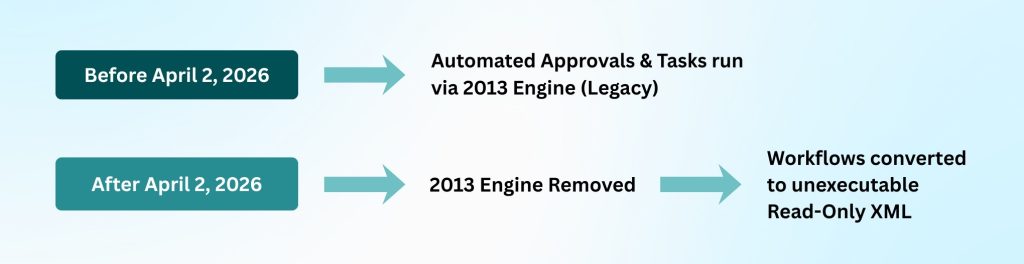
[Before April 2, 2026]
Automated approvals and tasks run via the SharePoint 2013 engine (legacy).
[After April 2, 2026]
2013 engine removed → Workflows are converted to unexecutable read-only XML.
Any automated document routing, procurement approval, or status update still tied to that old framework simply ceased to function. If your organization didn’t fully transition your automation estate before the spring deadline, those legacy processes are officially broken.
In this guide, we’ll unpack exactly what this deprecation means for your day-to-day operations and map out a practical, panic-free rescue plan to restore your critical business logic using modern alternatives like Power Automate.
The structural damage: What actually broke in your tenant?
When Microsoft deprecates an embedded service, the real-world operational impact can catch IT teams off guard. Legacy environments often contain deep webs of process logic built by engineers who left years ago. Because these applications ran reliably for a decade, they were easy to forget – until they stopped working.
If you’re currently triaging support tickets from confused business users, here’s what is happening under the hood:
- The engine is gone – The software architecture that read and executed SharePoint 2013 workflows no longer exists inside SharePoint Online.
- Your definitions are locked – If you attempt to open your old workflow designs in SharePoint Designer 2013, you will find you can no longer load or modify them. The underlying logic has been permanently frozen into read-only XML.
- Silence, not errors – Your users won’t see a dramatic crash or prominent error notification when they save a document. Instead, the item sits entirely static. Tasks fail to assign, emails never send, and custom status columns remain blank.
This sudden silence forces teams to rely on chaotic, manual workarounds. Employees start email chains to chase down project sign-offs, creating compliance gaps, slowing operational velocity, and piling technical debt onto your helpdesk.
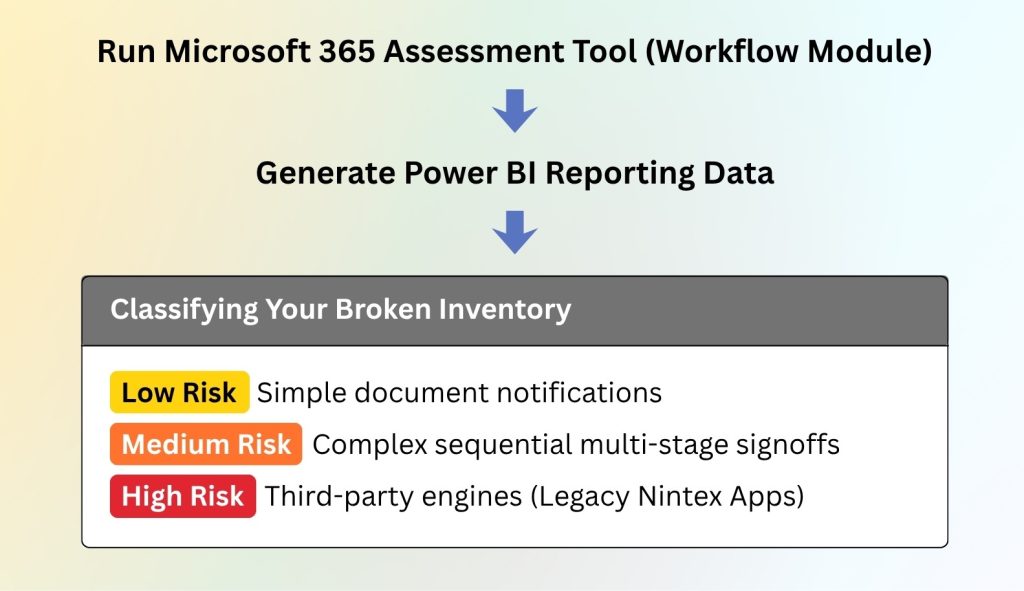
Phase 1: Rapid audit – Use the SharePoint Migration Assessment Tool (SMAT)
You cannot remediate an environment if you don’t know where the failures are occurring. The immediate priority is executing a thorough audit across your site collections to locate every dead process.
text
Run SharePoint Migration Assessment Tool (Workflow Module)
│
▼
Generate Power BI Reporting Data
│
▼
┌────────────────────────────────────────────────────────┐
│ Classifying Your Broken Inventory │
├────────────────────────────────────────────────────────┤
│ [Low Risk] Simple document notifications │
│ [Medium Risk] Complex sequential multi-stage signoffs│
│ [High Risk] Third-party engines (e.g., Nintex) │
└────────────────────────────────────────────────────────┘
Do not waste time directing your administrators to click through every document library manually. Instead, download the SharePoint Migration Assessment Tool (SMAT). This free, Microsoft-provided utility scans your tenant and compiles a structured inventory of active and inactive legacy workflows.
Once the tool finishes scanning, it outputs a detailed report that outlines:
- The exact location – Which site collections, sub-sites, and document libraries contain legacy logic.
- Execution history – When each workflow last ran successfully, allowing you to filter out obsolete processes that don’t need replacement.
- Migration readiness – An indicator of how easily the actions inside that specific process can be rebuilt in a modern cloud environment.
Reviewing this data helps you group your broken applications into a clear remediation backlog, moving high-priority revenue-generating paths to the front of the queue.
Phase 2: Re-architecting old logic for the modern cloud
Rebuilding your automation is not a direct translation – it requires re-architecting. Microsoft Power Automate is the native cloud replacement, and its design rules are fundamentally different from the old SharePoint Designer framework.
text
[Legacy Model] SharePoint 2013 Engine → Tight, rigid coupling to specific Lists
[Modern Model] Power Automate Cloud → API-driven, flexible cross-app triggers
Legacy workflows were tightly coupled with specific tables or libraries. They woke up, checked a local data field, made a change within that same library, and went back to sleep. Power Automate operates as an API-driven, cloud-wide integration layer. It allows your processes to look outside SharePoint, connecting data instantly with Microsoft Teams, Outlook, Dynamics 365, and external databases.
When you begin rebuilding, look for opportunities to modernize the user experience:
- Replace old emails with Teams notifications – Instead of cluttering an executive’s inbox with automated emails, use Power Automate to ping their Microsoft Teams chat with interactive adaptive cards, allowing them to approve an invoice with one tap.
- Leverage the Power Automate Approvals engine – The native Approvals connector manages sequential sign-offs cleanly, records full audit histories automatically, and tracks delegation paths – eliminating the complex custom coding required in the old engine.
- Consolidate multiple workflows – If you previously needed three separate legacy workflows for different stages of a project, you can often unify them into a single Power Automate cloud flow that uses conditional switch blocks based on project metadata.
Phase 3: Handling complex variables and third-party dependencies
Simple notification flows can be rebuilt in hours, but your audit will inevitably uncover a handful of highly complex processes that require careful handling.
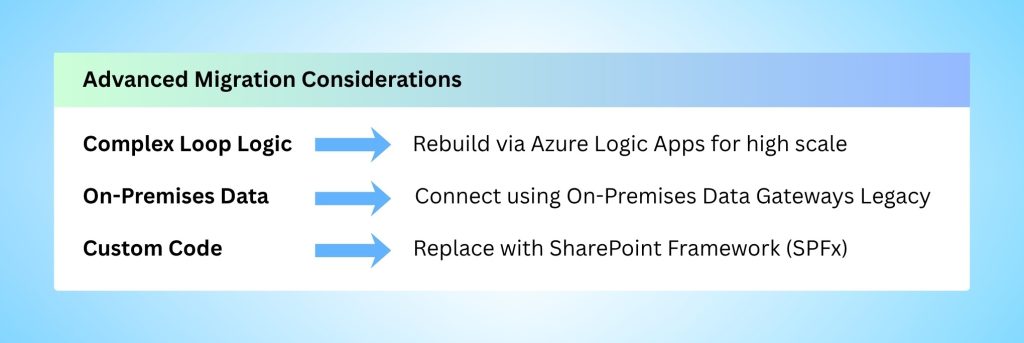
text
┌────────────────────────────────────────────────────────┐
│ Advanced Migration Considerations │
├────────────────────────────────────────────────────────┤
│ [Complex Loop Logic] → Rebuild via Azure Logic Apps │
│ [On-Premises Data] → Connect using On-Premises Gateway │
│ [Legacy Custom Code] → Replace with SharePoint Framework (SPFx) │
└────────────────────────────────────────────────────────┘
Keep an eye out for these specific architecture challenges:
Heavy loop processing and state machines
If an old process contains extensive loop-until logic or acts as an intricate state machine managing thousands of records daily, a standard Power Automate license might hit API throttling limits. For these high-scale workloads, consider Azure Logic Apps. It uses a similar visual designer but operates on a consumption-based pricing model built for massive enterprise data volumes. (Note: Logic Apps require separate licensing – not included in standard Power Automate plans.)
Third-party workflow tools
Many companies deployed tools like Nintex, K2, or others to handle process logic. What surprised many IT managers this spring was realizing that some of these tools sat directly on top of the native SharePoint 2013 workflow engine. Now that the underlying engine is gone, those specific custom forms and routing paths are failing. Resolving this requires shifting those setups toward modern cloud-native formats or rebuilding them directly within the Power Platform ecosystem. (If your third-party tool used its own proprietary engine, it may still work – verify with your vendor.)
On-premises data endpoints
If your old setup relied on hybrid connections to pull data from a physical SQL server inside your office, that communication path is broken. When configuring your new cloud flows, you will need to establish an On-Premises Data Gateway to allow your cloud automations to query your local hardware securely without opening security gaps in your firewall.
Phase 4: Testing, deployment, and governance guardrails
Rushing unverified cloud flows into production to stop complaints will only introduce new stability and security challenges. Your rescue plan must include a clear testing and governance phase.
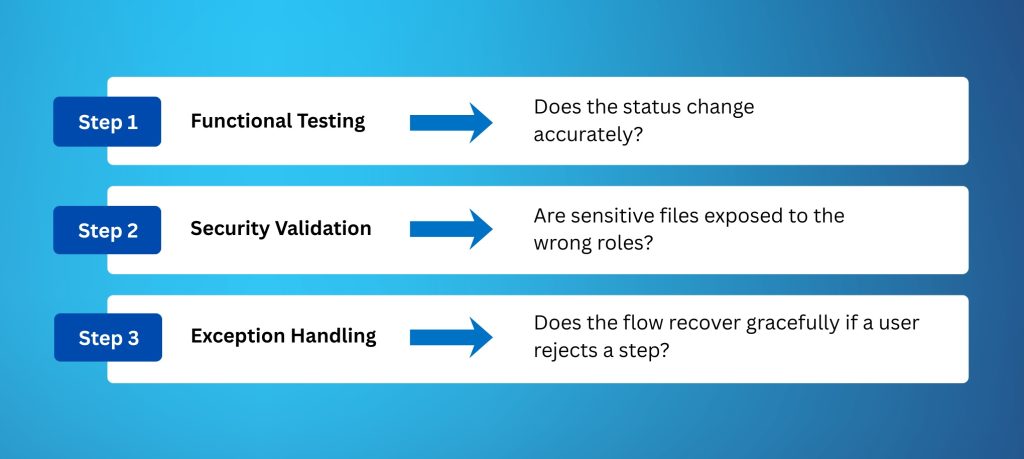
Create a dedicated staging site collection that mirrors your production document libraries. Run your new cloud flows through three verification steps:
- Functional Testing – Does the status change accurately?
- Security Validation – Are sensitive files exposed to the wrong roles?
- Exception Handling – Does the flow recover gracefully if a user rejects a step?
Once testing passes and you deploy the new flows, implement immediate governance guardrails. Power Automate is accessible, which means well-meaning users can easily create inefficient or redundant automations if left unmonitored.
Establish explicit Data Loss Prevention (DLP) policies within your Power Platform Admin Center. Restrict flows from mixing corporate SharePoint data with unapproved consumer cloud apps, ensuring your business-critical documents stay securely within your enterprise boundary.
Turn a technical bottleneck into an operational win
While a sudden platform deprecation is disruptive, it also gives your IT department a rare opportunity to clear away years of accumulated technical debt. Moving away from the rigid constraints of old 2013 infrastructure lets you deliver modern, responsive, and mobile-friendly digital experiences that your users will actually enjoy using.
You don’t have to untangle this old architecture alone. Taking a massive inventory of broken code and trying to plan an emergency remediation path can quickly overwhelm a busy internal infrastructure team.
Secure your Emergency Workflow Assessment
If your automations are down and your team is struggling to keep up with user support tickets, let Cambay Solutions help you stabilize the ship.
Our senior SharePoint architects understand how to unpack complicated legacy configurations quickly. Reach out to Cambay Solutions today to book a free Emergency Workflow Assessment. We’ll sit down with your IT leadership team, run a deep scan of your environment, identify your broken dependencies, and build an actionable, step-by-step roadmap to migrate your critical business logic into a modern, high-performing cloud ecosystem.
Ready to restore your workflows? Contact Cambay Solutions now.