


 Cloud Transformation
13 min

AI has already changed how many people work. Employees use it to summarize conversations, draft content, find information and accelerate everyday tasks.
But getting an answer is often only the beginning.
The more difficult part is what happens next: coordinating with stakeholders, following up on commitments, preparing for meetings, monitoring deadlines and identifying risks before they become blockers.
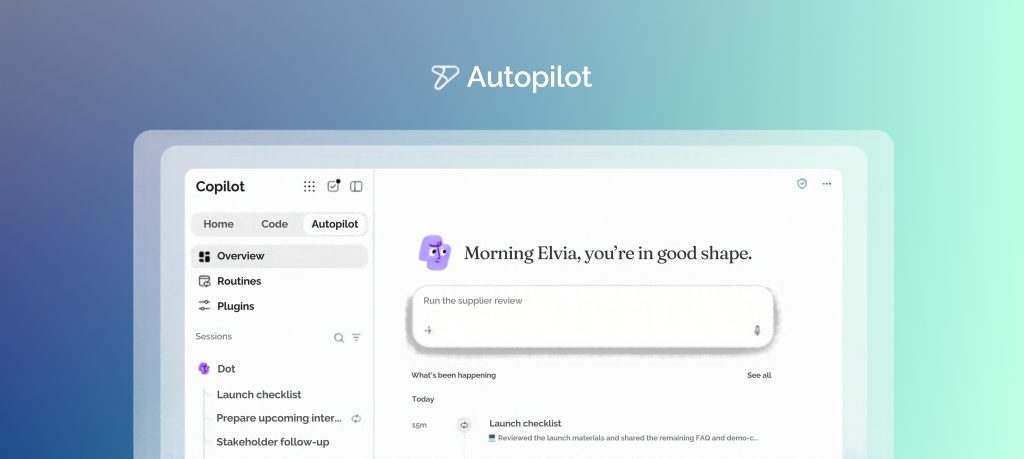
That is the opportunity Microsoft is addressing with Autopilot, an always-on, cloud-based personal agent designed to help keep work moving without requiring users to direct every step. [microsoft.com]
On December 9, 2026, Cambay Solutions, in collaboration with Microsoft, is hosting a live webinar focused on what Autopilot could mean for business and technology leaders.
Join Cambay Solutions and Microsoft Live on December 9
Beyond Copilot: Introducing Microsoft Autopilot and the Future of AI-Powered Work
The 45-minute webinar will be co-hosted by:
- John Wheat, Principal Customer Program Manager, Microsoft
- Aqeel Haider, M365 Practice Director, Cambay Solutions
Together, John Wheat and Aqeel Haider will explore where Autopilot fits within the evolving Microsoft Copilot experience, where persistent AI agents could create business value, and how organizations should approach security, governance and pilot readiness.
Date: Wednesday, December 9, 2026
Time: 2:00 PM CT
Duration: 45 minutes, including live Q&A
Cost: Free
Format: Live online webinar via Microsoft Teams
Register for the free December 9 webinar : https://cambaysolutions.com/event/beyond-copilot-microsoft-autopilot
What Is Microsoft Autopilot?
Microsoft describes Autopilot as an “always-on, cloud-based personal agent” that can help take work off a user’s plate and keep it moving without requiring direction at every step.
A user gives Autopilot a name and a goal. Autopilot can then support the preparation, coordination and follow-through associated with that objective while operating within the guardrails established by the organization.
For example, Autopilot may help:
- Monitor relevant updates connected to a goal
- Track open commitments
- Prepare information needed for upcoming work
- Support recurring coordination
- Carry context across conversations, projects and routines
- Operate across Microsoft Copilot, Teams and Outlook
Microsoft says Autopilot can learn a user’s priorities, preferences and working style over time. The objective is not simply to produce another AI-generated answer. It is to help users manage work that continues across multiple interactions.
This persistent operating model is what separates Autopilot from a traditional prompt-and-response experience.
Is Microsoft Autopilot the Same as Windows Autopilot?
No. The two offerings address completely different needs.
Microsoft Autopilot is an AI-agent experience associated with Microsoft Copilot. It is designed to help users coordinate and follow through on ongoing work.
Windows Autopilot is a separate Microsoft technology used by IT teams to deploy, configure and prepare Windows devices for organizational use.
The shared “Autopilot” name may create initial confusion, particularly for IT professionals familiar with Windows device management. The December 9 webinar will focus exclusively on Autopilot in the Microsoft Copilot experience, not Windows Autopilot.
From Microsoft Scout to Autopilot
Microsoft introduced a new category of always-on agents called Autopilots in June 2026. At that time, the company introduced Microsoft Scout as its first Autopilot agent. Microsoft’s original announcement has since been updated to state that Microsoft Scout is now Autopilot.
The original Scout announcement described an agent capable of remaining active in the background, understanding work across applications and systems, and taking action within the permissions and policies established by the user and organization.
Microsoft also explained that the agent builds context powered by Work IQ, helping it understand how work gets done, what matters to the user and what may need to happen next.
In September 2026, Microsoft introduced a new Copilot experience organized around Home, Code and Autopilot.
Home brings Chat and Cowork together. Chat supports conversational interactions such as questions, lookups and drafting. Cowork is designed for more complex work that a user delegates from beginning to end. Code helps users build solutions, while Autopilot introduces the persistent, proactive and personal-agent model.
These experiences are related, but they support different types of work:
- Chat: Ask a question or create a draft.
- Cowork: Delegate a defined task from end to end.
- Code: Build a solution using natural-language development capabilities.
- Autopilot: Support a continuing goal or responsibility that requires preparation, coordination and follow-through.
What Business Work Could Autopilot Support?
The strongest potential use cases are not necessarily isolated tasks. They are often ongoing, coordination-intensive responsibilities where important information is distributed across conversations, meetings, files and applications.
Potential scenarios include:
Meeting and workstream coordination
Autopilot could help monitor relevant updates, prepare materials, track commitments and support follow-ups connected to recurring meetings or programs.
Project and deliverable tracking
Teams may use a persistent agent to track open items, upcoming milestones and decisions that require attention.
Supplier and partner coordination
Autopilot could potentially support recurring review cycles, stakeholder communications, preparation activities and follow-up work.
Operational readiness
An agent could help monitor a continuing initiative, identify changes and prepare relevant information before a user needs to request it.
Risk awareness
Microsoft’s original Scout scenarios included identifying upcoming deliverables and stalled decisions so users could address potential issues before they became blockers.
The goal should not be to automate a process simply because AI is available. Organizations need to begin with a defined business challenge, establish measurable objectives and determine whether a persistent agent is the right approach.
Security and Governance Must Come First
A persistent agent may interact with sensitive organizational data, applications and workflows. That makes security and governance essential to any Autopilot evaluation.
Microsoft describes Autopilot as secure by design, with access controls and approval guardrails intended to help protect organizational data and keep consequential actions under human control.
Before starting a pilot, organizations should consider:
- What information the agent needs to access
- Which applications and resources should be available
- Which actions the agent may perform
- Which actions require human approval
- Who is accountable for the agent
- How activity will be monitored and audited
- How usage, cost and business value will be measured
- How the agent will be reviewed, restricted or removed
Persistent agents also make strong data governance increasingly important. Organizations should review SharePoint permissions, information access, sensitivity policies and other controls that determine which content an agent can reach.
This work should happen before an agent is broadly deployed, not after an access or oversharing problem appears.
The Role of Microsoft Agent 365
Microsoft Agent 365 provides a centralized control plane for discovering, managing, governing and securing AI agents across an organization’s environment. It supports agents built on Microsoft platforms as well as agents developed or acquired from third-party sources.
Microsoft organizes Agent 365 around management, governance, security and business value. Its capabilities include maintaining an inventory of agents, reviewing ownership and permissions, monitoring activity, applying security policies and connecting AI consumption to organizational outcomes.
Agent 365 works with Microsoft Entra, Microsoft Purview and Microsoft Defender to help organizations:
- Assign accountable ownership
- Apply identity and access controls
- Limit agents to required resources
- Protect sensitive organizational information
- Monitor risk and agent behavior
- Maintain records of agent activity
- Control tools and connections available to agents
- Track AI consumption and cost
For organizations planning to move from isolated experimentation to broader agent adoption, this centralized governance model will be an important consideration.

Is Microsoft Autopilot Available Today?
Autopilot is currently available as a preview through Microsoft’s Frontier program.
Microsoft’s current documentation identifies Autopilot as a preview capability and states that access requires applicable Frontier enrollment, preview assignment, licensing, administrative activation and participation terms. Frontier enrollment by itself does not automatically enable every preview feature.
Microsoft also warns that preview capabilities may have restricted functionality, may change during development and may not be released for general availability.
Organizations considering an Autopilot pilot should confirm the latest:
- Frontier eligibility
- Licensing requirements
- Administrative prerequisites
- Preview assignment requirements
- Activation steps
- Usage and spending policies
- Regional availability
- Data and security requirements
Microsoft currently describes Autopilot as using usage-based billing with Copilot Credits. Administrators can monitor usage and establish budgets, while final pricing and packaging are expected to be shared before general availability.
Because Autopilot remains in preview, organizations should focus on controlled evaluation instead of assuming production readiness.
Five Steps to Prepare for a Microsoft Autopilot Pilot
Cambay Solutions recommends a practical five-step readiness approach.
- Strengthen the data and security foundation
Review Microsoft 365 permissions, SharePoint access, information protection, sensitivity labels and data-loss-prevention policies.
The objective is to ensure an agent can access the information required for its role without receiving unnecessary access to sensitive or unrelated content.
- Confirm the current Microsoft requirements
Review Microsoft’s latest Frontier, licensing, preview, activation and administrative requirements.
Preview documentation can change quickly. Organizations should verify requirements immediately before implementation rather than relying on an earlier checklist.
- Choose a clearly defined workstream
Select an ongoing responsibility with:
- A clear business owner
- A defined objective
- Understandable inputs and outputs
- Measurable success criteria
- Manageable risk
- Sufficient human oversight
A recurring coordination process is often a better first candidate than a highly sensitive or business-critical workflow.
- Establish guardrails and accountability
Define which resources the agent can access, which actions it can perform and when human approval is required.
Assign an accountable owner and document how the organization will monitor activity, evaluate outcomes and respond to unexpected behavior.
- Pilot, measure and scale carefully
Begin with a limited pilot and evaluate:
- Business outcomes
- Time saved
- Accuracy and reliability
- User experience
- Security and compliance
- AI consumption and cost
- Frequency of human intervention
Scale only after the organization understands both the value and the operational implications.
How Cambay Solutions Can Help
Cambay Solutions helps organizations prepare for Microsoft Copilot and AI agents through:
- Copilot readiness and security assessments
- Microsoft 365 permissions and access reviews
- Microsoft Purview configuration
- AI-agent governance planning
- Copilot Studio agent development
- Pilot strategy and use-case prioritization
- Adoption and change-management programs
- Business-value and success-measurement frameworks
Cambay Solutions’ role is to help organizations move from interest in AI agents toward a practical, controlled and measurable adoption strategy.
That may begin with resolving permissions and governance gaps. For other organizations, it may involve selecting an appropriate first use case, establishing pilot guardrails or developing an implementation roadmap.
Meet the Webinar Co-Hosts
John Wheat, Principal Customer Program Manager, Microsoft
John Wheat will bring a Microsoft perspective to the webinar, helping attendees understand the evolution of Microsoft Copilot and emerging agent-powered ways of working.
Aqeel Haider, M365 Practice Director, Cambay Solutions
Aqeel Haider leads Cambay Solutions’ Microsoft 365 practice. His portion of the webinar will focus on the practical side of AI-agent readiness, including data security, governance, use-case selection and controlled pilot planning.
Together, John Wheat and Aqeel Haider will connect the Microsoft product vision with the security, operational and adoption considerations organizations need to evaluate.
Register for the December 9 Webinar
Join Cambay Solutions and Microsoft for:
Beyond Copilot: Introducing Microsoft Autopilot and the Future of AI-Powered Work
Date: Wednesday, December 9, 2026
Time: 2:00 p.m. CT
Duration: 45 minutes, including 10 minutes of live Q&A
Co-hosts: John Wheat, Microsoft, and Aqeel Haider, Cambay Solutions
Cost: Free
Location: Online via Microsoft Teams
During the session, attendees will learn:
- What Microsoft Autopilot is
- Where it fits within the Microsoft Copilot experience
- How persistent agents differ from prompt-based AI
- Which business scenarios may be appropriate
- Why identity, security and governance matter
- How to prepare for a controlled first pilot
Registrants will receive access to the webinar recording. They may also receive an invitation to request a complimentary introductory Autopilot readiness consultation with Cambay Solutions, subject to availability and eligibility.

Frequently Asked Questions About Microsoft Autopilot
What is Microsoft Autopilot?
Microsoft Autopilot is an always-on, cloud-based personal AI agent designed to help keep work moving without requiring a user to direct every step. Users give Autopilot a name and a goal, and it can support preparation, coordination and follow-through within the guardrails established by the organization.
How is Microsoft Autopilot different from Microsoft Copilot Chat?
Copilot Chat is designed primarily for conversational work, such as asking questions, finding information and creating drafts. Autopilot is designed to support work that continues over time, including monitoring relevant updates, tracking open commitments and preparing what may be needed next.
How are Chat, Cowork, Code and Autopilot organized?
Microsoft describes the new Copilot experience around Home, Code and Autopilot. Home brings Chat and Cowork together. Chat supports immediate conversational work, Cowork supports complex delegated tasks, Code helps users build solutions, and Autopilot supports persistent, proactive work.
Is Microsoft Autopilot the same as Windows Autopilot?
No. Microsoft Autopilot is an AI-agent experience associated with Microsoft Copilot. Windows Autopilot is a separate device-deployment and configuration technology used by IT teams.
Is Microsoft Autopilot generally available?
No. Microsoft’s current documentation identifies Autopilot as a preview capability available through the Frontier program. Access is subject to applicable enrollment, licensing, preview assignment, administrative activation and participation requirements.
What is the Microsoft Frontier program?
Frontier provides eligible organizations with access to selected preview Microsoft AI capabilities. Enrollment alone does not enable every feature. Access to Autopilot also depends on relevant licensing, preview assignment, spending policy, activation and other requirements.
How is Microsoft Autopilot governed?
Microsoft describes Autopilot as having built-in access controls and approval guardrails. Organizations can use Microsoft Agent 365 to observe, manage, govern and secure agents, while Microsoft Entra, Microsoft Purview and Microsoft Defender provide supporting identity, data-protection and security capabilities.
What is Microsoft Agent 365?
Microsoft Agent 365 is a centralized control plane for discovering, managing, governing and securing AI agents. It supports agent inventory, access governance, lifecycle management, security monitoring and business-value measurement.
How much does Microsoft Autopilot cost?
Microsoft currently says Autopilot uses usage-based billing with Copilot Credits. Administrators can review usage and establish budgets. Microsoft says final pricing and packaging will be provided before general availability.
What is a good first use case for Microsoft Autopilot?
A strong first use case is typically a recurring, coordination-intensive workstream with a clear owner, measurable objective and manageable risk. Examples may include meeting preparation, project follow-up, supplier coordination or tracking open commitments.
Who should attend the December 9 webinar?
The session is designed for CIOs, CTOs, IT directors, Microsoft 365 and Copilot administrators, security and compliance leaders, operations teams, program leaders, digital-transformation teams and business leaders evaluating AI agents.
Who is hosting the Microsoft Autopilot webinar?
The webinar is being hosted by Cambay Solutions in collaboration with Microsoft. It will be co-hosted by John Wheat, Principal Customer Program Manager at Microsoft, and Aqeel Haider, M365 Practice Director at Cambay Solutions.
How can I register for Microsoft Autopilot webinar?
The webinar is free and will take place on December 9, 2026, at 2:00 p.m. CT.
Click here and register now – Register through Microsoft Teams